
- Posts: 6
- Thank you received: 0
Forum
- You are here:
- Home
- Forum
- Components
- JC Dashboards
- Responsive layout issue
Responsive layout issue
- John Kawas
- Topic Author
- Offline
Less
More
3 years 4 months ago #37
by John Kawas
Responsive layout issue was created by John Kawas
JC Dashboard is really nice and easy to use, however I have noticed that if you have two rows of panels the second row will not line up in the correct order. For instance, I have 3 gauges on the top row showing topics A, B and C.The second row is a numeric showing the actual value of each topic (A, B, C) directly under the same topic. The problem is when the page is viewed on a tablet or phone the second row shows in the following order: C, B, A
I have this on a laptop screen:
First Row: Topic A, Topic B, Topic C
Second Row: Topic A, Topic B, Topic C
I have this on a phone screen:Topic A Topic B Topic C Topic C Topic B Topic A .
Can I use HTML/CSS to correct this? or is there a simpler solution to get the vertical layout to be in the proper order? I an regular bootstrap break this would be ABCABC, correct?
Thank you
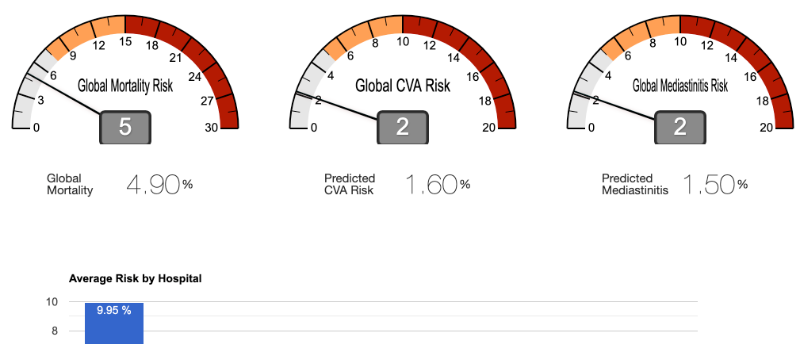
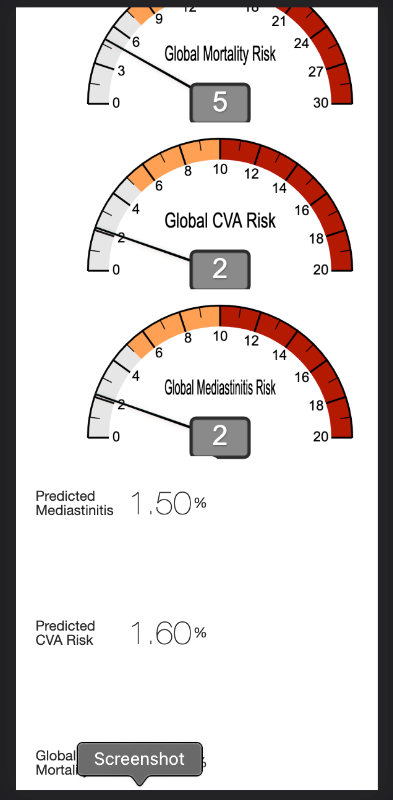
I have this on a laptop screen:
First Row: Topic A, Topic B, Topic C
Second Row: Topic A, Topic B, Topic C
I have this on a phone screen:Topic A Topic B Topic C Topic C Topic B Topic A .
Can I use HTML/CSS to correct this? or is there a simpler solution to get the vertical layout to be in the proper order? I an regular bootstrap break this would be ABCABC, correct?
Thank you
Attachments:
Please Log in or Create an account to join the conversation.
- JoomCode Admin
-

- Offline
Less
More
- Posts: 23
- Thank you received: 3
3 years 4 months ago #38
by JoomCode Admin
Replied by JoomCode Admin on topic Responsive layout issue
Hi John,
JCTables uses gridster framework to handle the responsiveness, and the mobile display order is very much dependent on the order that you placed the panels.
Looking at your layout, it looks like you have 3 panels for top row, and 3 panels for bottom row.
If you want the text to be linked to the donut graph, it is probably better to add the text widget to the donut panel instead.
You can add as many widgets/plugins as you wish to a panel.
You dont have to redo it, simply click the COPY icon of the text widget, and go to the top panel and select the paste icon. It will then paste the widget in below the donut.
Dont forget to change the panel height of the donut to include the height of the text widget. So if your donut is 20 blocks and text 6 blocks, then make the panel 26 or 27 blocks.
best regards
Paul.
JCTables uses gridster framework to handle the responsiveness, and the mobile display order is very much dependent on the order that you placed the panels.
Looking at your layout, it looks like you have 3 panels for top row, and 3 panels for bottom row.
If you want the text to be linked to the donut graph, it is probably better to add the text widget to the donut panel instead.
You can add as many widgets/plugins as you wish to a panel.
You dont have to redo it, simply click the COPY icon of the text widget, and go to the top panel and select the paste icon. It will then paste the widget in below the donut.
Dont forget to change the panel height of the donut to include the height of the text widget. So if your donut is 20 blocks and text 6 blocks, then make the panel 26 or 27 blocks.
best regards
Paul.
Please Log in or Create an account to join the conversation.
- John Kawas
- Topic Author
- Offline
Less
More
- Posts: 6
- Thank you received: 0
3 years 4 months ago #39
by John Kawas
Replied by John Kawas on topic Responsive layout issue
Got it! That is a simple solution! Worked on my first try! Thank you!
Please Log in or Create an account to join the conversation.